

Will the Limit Last Until the Reset? How I Forecast Claude Code, Codex and Kimi Code Usage
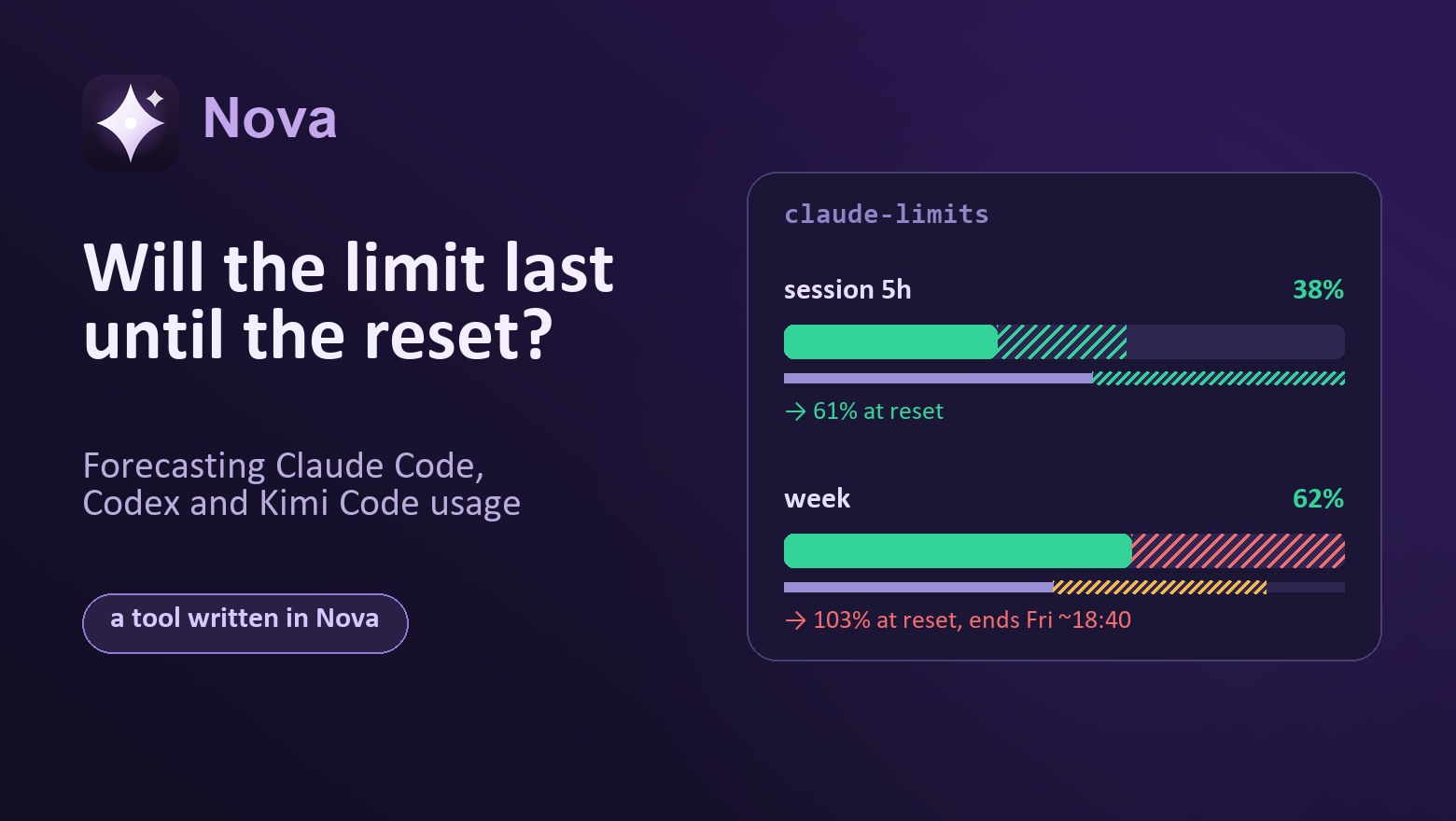
A Claude Code subscription has more than one limit: a five-hour session, a general weekly window, and separate weekly limits for some models, for example Fable. Codex and Kimi Code work in a similar way but with their own windows: Kimi sometimes has a monthly one, and newer plans have no weekly window at all. You can check what is left with the /usage command, but only inside an open session and only for the account that session runs under.
My projects run on different accounts, and the question I usually have is different: which of them will last until the reset? Is 60% by Wednesday a lot or fine? If I keep working at the same pace, will I hit the limit on Friday evening?
That is why I built claude-limits: a small local server that asks for the limits of all your accounts every few minutes and shows them on one page. There can be several accounts, even for the same service: I have, for example, a personal and a work Claude Code, plus Codex and Kimi Code next to them. The main thing it does is forecast, and that is what this article is about.
What the page shows
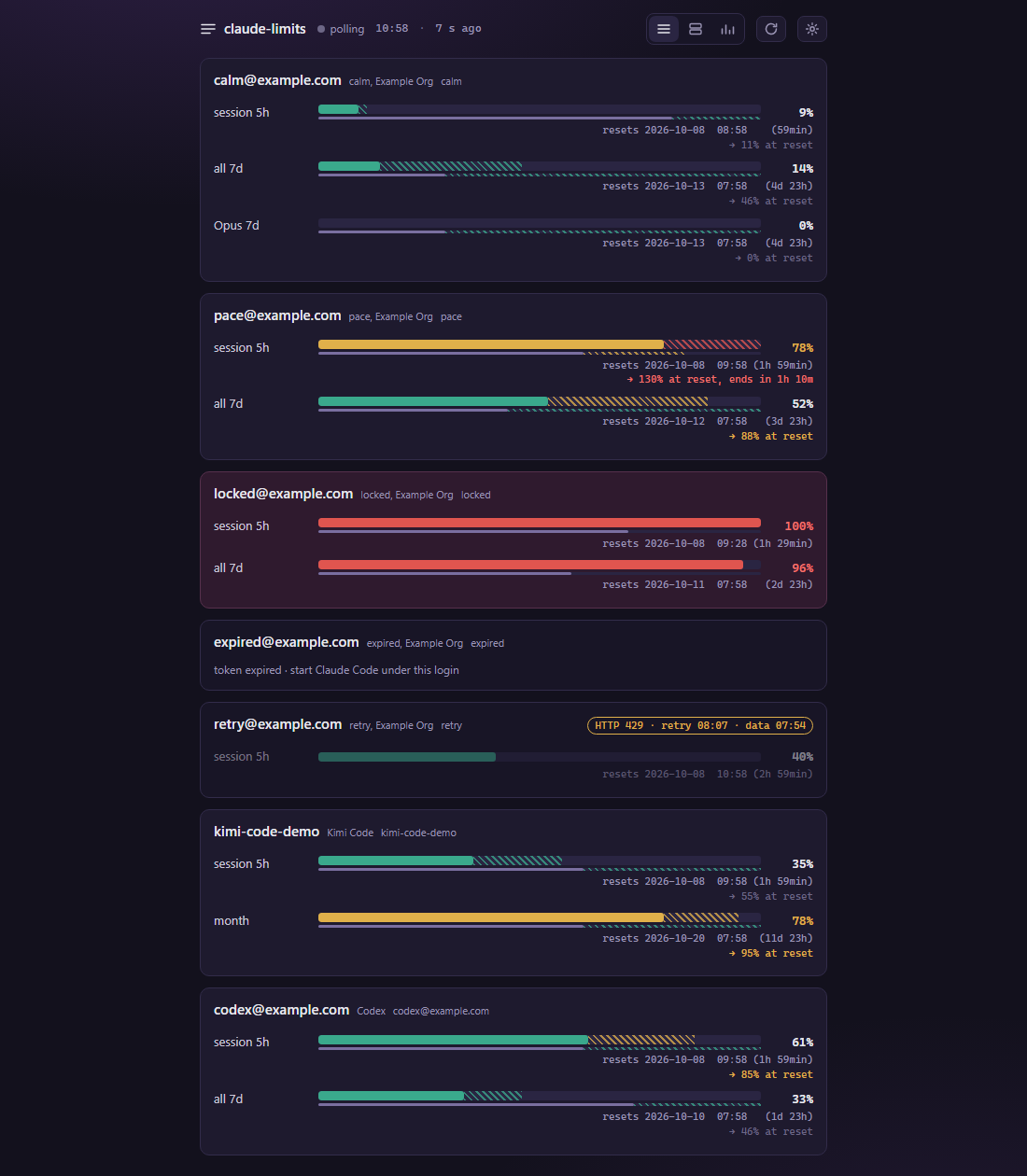
Each card is one login, each row is one limit window. The thick bar shows how much has been spent: green, yellow from 70%, red from 90%. Under it is a thin line: how much of the window has already passed. If the bar is ahead of the line, you are spending faster than time is passing.
On top of that come two forecasts, both drawn as hatching.
- On the thick bar: where usage will be at the moment of the reset if the pace does not change. Caption:
→ 46% at reset. - On the thin line: what share of the window the quota will last. If it lasts until the reset, the hatching is green all the way.
The first answers “how much will be left”, the second “when will it run out”. Below is how they are computed and where I got it wrong.
Forecast one: percent at reset
The simplest thing to do is linear extrapolation: take the rate of spending and extend it to the reset. The only question is which rate to take.
If you take the average over the whole window, the forecast will remember that you barely worked on Monday and will be wrong on Thursday. So the rate is computed from recent history: the last hour for the session, the last three days for the week and the month. The rate is the pace of work, not a property of the window, so if the window reset within those three days, the tail of the previous window counts too. Only the stretch where the limit was exhausted and usage stood still is cut off. The tool notices the reset itself by a sharp drop in the percentage.
Then the arithmetic (src/model/forecast.nv):
    ro rate_x1e6 = (used_percent * 1000000) / window_min

    // `rate <= 0` means the spend did not grow over the window: the honest forecast is
    // "it stays where it is", not a fall (§2.7).
    if rate_x1e6 <= 0 {
        return { available: true, percent_at_reset: percent_now, runs_out_in_min: -1,
                 rate_per_hour_x100: 0, basis, warning: false }
    }

    ro at_reset = percent_now + (rate_x1e6 * remaining_min) / 1000000
    ro left = 100 - percent_now
    ro runs_out = if at_reset < 100 { -1 } else { (left * 1000000) / rate_x1e6 }
The rate is stored as an integer, in millionths of a percent per minute. Why not f64: the tool has a reference implementation in Python, and both versions must produce exactly the same caption down to the last digit. Floating point would add one more way to diverge in the last place. At first the precision was in hundredths, and in one example 2.06% per hour turned into 1.80%: dividing 7400 by 2160 in integers gives 3. With ten-thousandths, the run-out moment still lagged the reference by 46 minutes. With millionths the difference disappeared.
Two more rules. The forecast never promises that usage will go down: if it did not grow over the interval, the honest answer is “it stays where it is”. And if usage at the reset comes out above 100%, the moment the limit runs out is computed. The caption then gets longer: → 103% at reset, ends Fri ~18:40 (14h 58min).
The colour of the hatching depends on the forecast at the reset: yellow from 80%, red from 95%. So you can see a green bar at 40% with red hatching up to 95%. That is intended: everything is fine now, but by Friday it will not be.
When it is too early to trust the forecast
The first version needed only half an hour of history. After the first hour of work with 1% of the weekly limit, it confidently drew red: if you spend like this all week, the limit runs out in four days. The arithmetic is right, but one hour of work says nothing about a week.
Now the forecast appears only when the history covers at least 5% of the window, and no less than half an hour:
    ro span_ms = now_ms - first.at_ms
    ro min_span_ms = MIN_SPAN_MS.max(((l.window_sec + 19) / 20) * 1000)
    if span_ms < min_span_ms { return None }
For the session that is 30 minutes, for the week 8 hours 24 minutes, for Kimi’s monthly window 36 hours. Until then there is no hatching on the page, and the percentage has a forecast later hint. The specification explicitly calls this rule a heuristic of sufficient history, not a promise of accuracy.
No forecast is computed when the numbers cannot be trusted either: the account is locked, the token has expired, or the server answered 429.
Forecast two: what share of the window the quota will last
When the limit runs out before the reset, the percent at reset says little. What matters more is how much longer you can work. For that, the thin line under the bar also gets hatching: from “now” to the moment the quota runs out at the current pace. If it does not run out before the reset, the hatching goes to the end of the window and stays green. If it runs out before 95% of the window has passed, it is yellow; before 80%, red.
This is where a test caught a bug. The window length was first taken from the server’s response, and the progress from the window type (5 hours, 7 days, 30 days). The hatching and the fill were measured with different rulers and diverged at the edges. Now both are computed from the same window.
There is also an open question, recorded in docs/open-questions.md. The two hatchings of one row are coloured on different scales: the upper one by percent at reset (80/95), the lower one by share of the window (80/95 of the window). With a forecast of 97%, the upper one is already red while the lower one is still green: the limit will run out, but minutes before the reset. Both are right, but side by side it looks like a contradiction. I have left it as it is for now.
Nights and weekends
A linear forecast does not know that you sleep at night. On Friday evening it looks at the pace of the working day and promises that the limit will run out by Monday. The specification says so directly: without a schedule, the Friday evening forecast is always “not enough”.
So there is a manual work schedule: working days, hours, and the share of the pace outside them. A minute inside the schedule counts fully, a minute outside it counts less. The rate is computed over these “effective” minutes, and the run-out moment is also found by walking forward with weights. By default the schedule is off: I do not want the tool to guess someone else’s routine.
This approach has a weak spot. If all recent history was recorded at night, with the schedule on there are zero effective minutes. That used to produce a flat made-up forecast; now it is an honest “no data yet”.
For now the rhythm is set by hand. Learning it automatically is the next step.
Where the numbers come from
The tool takes the same numbers that /usage shows: for Claude it is the OAuth usage endpoint, Kimi Code and Codex have their own. None of the three is documented, and that is the main limitation: any update can break them. The README and the release notes say so.
The tool does not guess which logins to read: the directories with credentials are set in the settings, as shown at the end of the article. The list is re-read every round, so a new login appears without a restart.
The tool only reads Claude’s files. If a token has expired, it refreshes it by running Claude Code itself under the right directory and writes nothing to its files. The Kimi token is refreshed directly, and Codex is not refreshed at all.
Live requests brought surprises that the tests did not have:
- without the
anthropic-beta: oauth-2025-04-20header, Claude’s endpoint rejects the request, and the mocks of course did not know that; - the response arrives in chunks (
Transfer-Encoding: chunked), the body started with9fc, and JSON parsing failed, so I had to write my own parsing; - on a 429 response, the first version wiped the numbers from the screen exactly when they were most needed. Now the last good snapshot stays in place, dimmed, marked
429 · retry HH:MM · data HH:MM: when the next attempt will be and how old the numbers are.
Why Nova
claude-limits is written in Nova, a language I am developing, and it is the first real program in it: about 17 thousand lines of code and almost as many lines of tests, an HTTP client with TLS, a web server on Polaris, a web framework also written in Nova, and history in DuckDB. DuckDB is an embedded database like SQLite, but geared towards analytical queries. It is built right into the executable, so nothing needs to be installed separately.
Three features of the language were the most useful here.
Effects in the signature. The function that collects data for all accounts declares what it works with: fn collect_round(rounds Rounds) Http Dirs Creds Time -> Round. Dirs and Creds are custom effects for directories and tokens, and they have no write operations. Code like this cannot write to Claude’s files: there is simply no operation to call.
Tests without a mocking framework. The network and the clock are replaced by a handler right in the test:
fn poll_against(raw str) -> AccountState {
    mut state = AccountState.Unknown
    with Http = effect Http {
        send(host, port, secure, request) -> Result[str, HttpError] { Ok(raw) }
    } {
        state = fetch("api.example.com", 443, true, "/v1/usage", "t").outcome.state
    }
    state
}
The fetch function is the same as in production code, only the network answers with a predefined string. That is how 429s, chunked parsing and expired tokens are all tested.
A token as a resource. The Secret type is declared consume: it cannot be copied, and debug printing shows Secret(hidden). A token cannot accidentally end up in a log or be passed to two places.
There were hard parts too: the language is young, and the compiler still has bugs. Several types had to be renamed: Outcome collided with another name in the generated C, Token with the type of the same name in the standard JSON library, and Forecast confused the type checker with the settings type config.Forecast. There was a defect that made every moment in time read as midnight. These bugs were fixed in the compiler, and the tool served as a test for them.
How it differs from alternatives
Other tools can forecast usage too.
- ccusage in
blocks --livemode shows the rate and a forecast for the five-hour window. It counts from local logs and compares with a limit you set yourself. - claumon takes the same official numbers and gives a forecast at the reset with an interval.
- Claude Code Usage Monitor and ReserveGauge forecast too; the latter remembers several accounts.
- Claude Tuner computes the rate over active hours and takes the user’s weekly rhythm into account by itself. According to its author, this cut daytime overestimation by 63%.
What claude-limits has:
- all logins on one page, for three services at once: Claude Code, Codex and Kimi Code;
- the official
/usagenumbers, the same as in Claude Code itself; - two forecasts for every window: percent at reset and the share of the window the quota will last;
- working days and hours set in the settings, so nights and weekends do not inflate the forecast; saved history; browser notifications at 70% and 90%.
Limitations
- The endpoints are undocumented and may break.
- The forecast is a linear extrapolation between two points, without smoothing. The daily rhythm is only taken into account through the manual schedule.
- A ready-made build exists for Windows x64. On Linux, the Python reference implementation from the same repository works for now, and on macOS tokens live in the Keychain, which is out of scope.
- After a 429 response, the tool does not yet pause an individual account: all accounts are polled at a common interval, every 5 minutes by default.
How to try it
- Download
claude-limits-0.1.1-windows-x64.zipfrom the releases page and unpack it. - Run
claude-limits --serveand openhttp://127.0.0.1:7391in a browser. - At first the page is empty: the tool does not look for logins by itself. Open the settings (the button at the top of the page), paste the path to the directory with credentials into the Login folders section, press Check, then Save:
- Claude Code — the directory with
.credentials.json, usually%USERPROFILE%\.claude. You can also point to a folder containing several such directories, and all the logins will be picked up at once; - Kimi Code —
~/.kimi-code; - Codex —
~/.codex, whereauth.jsonlives.
- Claude Code — the directory with
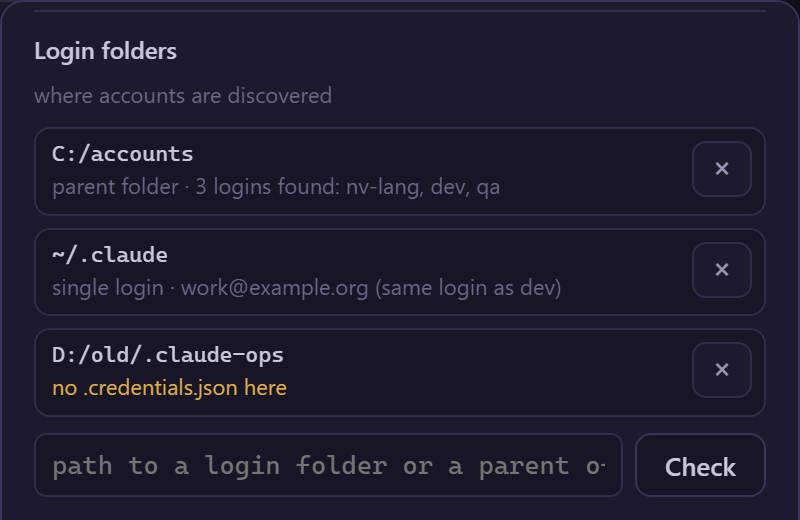
The accounts appear from the next polling round. The same paths can be written by hand in claude-limits.toml under [[folders]].
How do you keep track of your limits? Is /usage enough for you, or have you also hit the limit at the worst possible moment?
Originally published in Russian on Habr: habr.com/ru/articles/1097586.